Here’s how to stop checking your phone in the morning: remove the reasons you touch it first. Wake to a separate alarm clock, charge the phone outside the bedroom, hold notifications until later, and give your first 15 minutes a set job such as water, clothes and daylight. Then make the apps you scroll wait for a real-world action, so the first unlock happens after you’re up.
Key takeaways
- Most morning phone checks start with the alarm: the phone that wakes you is already in your hand.
- In a 2018 Pew Research Center survey, 44% of US teens and 26% of parents said they often check for messages as soon as they wake up.
- Each pull (alarm, notifications, news, boredom) has its own swap; fixing the biggest one does most of the work.
- Batching notifications into a few set times a day left people more attentive and less stressed in a randomized field experiment.
- A “not until I’ve been outside” rule beats a vague “not first thing,” because it has a clear finish line.
In this guide
- Why do you check your phone as soon as you wake up?
- Is checking your phone first thing in the morning bad?
- The first-touch audit: what pulls you to the phone?
- 7 swaps that stop the morning phone check
- How do you wake up without checking your phone?
- What if you need your phone in the morning?
- How long does it take to break the habit?
- FAQ
Why do you check your phone as soon as you wake up?
You check your phone on waking because it’s already in your hand. For most people the phone is the alarm, so the first action of the day is touching it, and the lock screen shows notifications before you’ve sat up. The habit runs on a cue (alarm off), a routine (open an app) and a reward (something new).
It’s common. In a Pew Research Center survey from March to April 2018, 44% of US teens and 26% of their parents said they often check for messages or notifications as soon as they wake up. That’s not a failure of character. It’s a well-practised loop, and loops change when you change the cue.
Is checking your phone first thing in the morning bad?
Checking your phone first thing isn’t dangerous, but it hands your first minutes to other people’s priorities. Messages, news and feeds set the agenda before you’ve chosen one, and the habit keeps you in a dim bedroom when daylight would help you feel awake. The case for waiting is about attention and light, not harm.
Two studies point the same way. In a randomized field experiment with 237 people (Fitz and colleagues, 2019), those whose notifications arrived in three batches a day felt more attentive, more productive and more in control of their phones, and reported lower stress, than people who got notifications as usual. A 2017 study by Ward and colleagues found that the mere presence of a person’s own smartphone was linked to lower available cognitive capacity on tasks, even when the phone was face down.
The light side matters too. Morning daylight is the main signal that sets your body clock, and bright outdoor light is many times brighter than a bedroom. The Sleep Foundation recommends getting light early in the day for that reason. Twenty minutes of scrolling in bed is twenty minutes you aren’t getting it.
The first-touch audit: what pulls you to the phone?
Before changing anything, spend two mornings noticing the first reason you pick up the phone. Most people find one or two pulls account for nearly every check. Write each one down, then match it to the swap in the table. Fixing the top pull usually breaks the chain, because the other checks only happen once the phone is already unlocked.
| The pull | What it looks like | The swap |
|---|---|---|
| Alarm | You switch off the alarm and you’re already on the home screen | A separate alarm clock (swap 1) |
| Reach | The phone is on the nightstand, so you grab it half-awake | Charge it outside the bedroom (swap 2) |
| Notifications | The lock screen lists 14 things and one of them looks urgent | Scheduled delivery (swap 3) |
| “What did I miss?” | News, group chats, email, all before getting up | A set check-in time (swap 6) |
| Boredom or dread | Scrolling to delay the start of the day | A first job ready to go (swap 5) |
| Muscle memory | Instagram is open before you decided anything | Grayscale and a lock until you’re up (swaps 4 and 7) |
7 swaps that stop the morning phone check
Each swap below removes one pull from the audit. Start with the one that matches your biggest pull, then add one more each week. Paths are for recent versions of iOS and Android; names can differ slightly by phone.
1. Wake up to an alarm clock, not your phone
A basic alarm clock costs about the same as a takeaway lunch and removes the single biggest cue. If the phone isn’t what wakes you, you don’t have to touch it to stop the noise. A sunrise-style clock that brightens before the alarm is a nice extra, but any clock works.
2. Charge the phone outside the bedroom
Distance is the strongest friction you can add. A charger in the hallway or kitchen means checking the phone needs you to get up, and once you’re up, the urge often passes. Our guide on how to stop using your phone before bed covers how to replace everything the phone does at night so this rule holds.
3. Hold notifications until a set time
On iPhone, go to Settings > Notifications > Scheduled Summary and add a delivery time after you expect to be up and out. Pair it with the Sleep Focus so it stays on until your wake-up time. On Android, Bedtime mode in Digital Wellbeing silences the phone overnight on most versions. Calls from favourites can still come through on both.
4. Make the screen boring
Grayscale takes some of the pull out of feeds. On iPhone it lives at Settings > Accessibility > Display & Text Size > Color Filters. Android’s Bedtime mode can turn the screen grayscale until morning on many phones. Move social apps off the first home screen as well, so they need a search to open.
5. Give the first 15 minutes a job
A blank morning invites the phone in. Set out a glass of water, clothes and shoes the night before, so the first steps are already decided. If the scroll is a way to avoid the day, a small first task that’s physical and easy (open the curtains, put the kettle on) gets you moving before the dread does.
6. Use a rule with a finish line
“Not first thing” is too vague to hold at 6:45am. “Not until I’ve been outside” or “not until I’ve had breakfast” has a clear end, so there’s nothing to negotiate. Pick a fixed check-in time for messages and news, and the “what did I miss?” pull has somewhere to go. Planning “if X, then Y” rules like this in advance is called an implementation intention, and a meta-analysis of 94 tests found it had a medium-to-large effect on reaching goals.
7. Lock the apps you scroll until you’re up
The most reliable swap removes the choice. An app blocker can keep TikTok, Instagram or YouTube closed for the first part of the day, while calls, messages and maps stay open. The strongest versions tie the unlock to something you do, not a code you remember, which matters because the 6am you knows every passcode. Our post on how people bypass Screen Time shows why passcode-only blocks tend to slip.
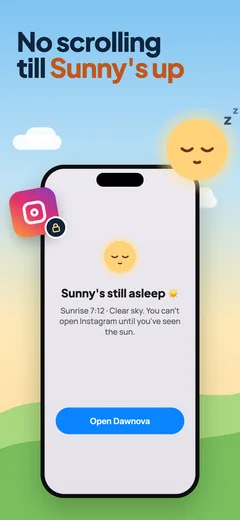
That’s how Dawnova (our app) works. Its Morning Focus feature keeps the apps you choose blocked after you wake until you walk 15 steps and snap a photo of the sky. Sunny makes sure it’s really the sky, not a ceiling or a screen, and on dark winter mornings a photo of your lamp counts instead. Setup takes a couple of minutes; the Morning Focus help article walks through it. Morning Focus is part of Dawnova Pro (see plans), and your first morning is free.
How do you wake up without checking your phone?
Wake up without checking your phone by running the same short sequence every day, so there’s no gap for it to fill. A good one takes about 15 minutes: alarm clock off, feet on the floor, water, curtains open, dressed, then outside for a few minutes of daylight. The phone comes after the last step.
- 0 min: Alarm clock off. Sit up straight away; lying back down is where the reach starts.
- 1 min: Water from the glass you set out last night.
- 2 min: Curtains or blinds open, lights on.
- 3-8 min: Bathroom, dressed, shoes on.
- 8-15 min: Step outside, even onto a balcony or doorstep. On a grey day, stay a little longer; our guide to morning sunlight on cloudy days explains why it still counts.
- After: Pick up the phone, at a time you chose.
If you want a fuller plan, our morning routine without your phone lays out 10, 25 and 45-minute versions you can pick from based on how much time you have.
Why it sticks. The swap works because it replaces the cue instead of fighting the urge. When the alarm isn’t on your phone and the apps open after you’ve been outside, the morning check stops being a decision. You just do the next step, and the phone is waiting when you’re done.
What if you need your phone in the morning?
If you need your phone in the morning for calls, two-factor codes, a sick kid or an on-call shift, block the apps that pull you in rather than the whole phone. Phone, Messages, Maps and your authenticator can stay open while social and video apps wait. That keeps you reachable without opening the feed.
In Dawnova, you pick exactly which apps Morning Focus blocks, so anything you need stays available. If you’d rather block everything except a short list, the allowlist does that; see the allowlist help article. For a block at any other time of day, a Quick Block runs for 15 minutes to 2 hours.
How long does it take to break the habit?
Expect about two months, with a wide range. In a University College London study of 96 people (Lally and colleagues, 2010), a new daily habit took a median of 66 days to feel automatic, with individual estimates from 18 to 254 days. Missing a single day didn’t make a meaningful difference.
That last finding is the useful one. A morning when you grab the phone isn’t a reset to zero. Keep the alarm clock and the charger where they are, and do the sequence again tomorrow. If evenings are where the phone time really builds up, start with our guide to how to stop doomscrolling, and see the morning and night routine post for how the two ends of the day connect.
Frequently asked questions
Why do I reach for my phone as soon as I wake up?
Usually because the phone is your alarm, so touching it is the first thing you do, and the lock screen shows notifications straight away. After hundreds of mornings it becomes automatic. Moving the alarm to a separate clock and charging the phone in another room removes the cue that starts the loop.
How long should I wait before checking my phone in the morning?
There’s no official number. A practical rule is to wait until after a fixed step, such as getting dressed, having breakfast or spending a few minutes outside. A step works better than a time limit because it has a clear finish line and gets you up and into daylight first.
Is it OK to use my phone as an alarm if I don’t look at anything else?
It can work, but it’s the hardest version to stick with, because the alarm puts the phone in your hand and the notifications are one swipe away. If you keep the phone alarm, put the phone across the room, turn on Scheduled Summary and lock your scrolling apps until you’re up.
What should I do instead of checking my phone in the morning?
Give the first 15 minutes a short, fixed sequence: water, curtains open, get dressed, then a few minutes outside. Other good options are a coffee by the window, stretching, a short walk or reading a few pages of a paper book. The point is that the next step is decided before you wake.
Can an app help me stop checking my phone in the morning?
Yes. An app blocker can keep your most-scrolled apps closed for the start of the day while calls and messages stay open. Dawnova’s Morning Focus unlocks them after you walk 15 steps and snap a photo of the sky, so the first unlock of the day happens once you’re up and outside.
Sources
- Pew Research Center, How Teens and Parents Navigate Screen Time and Device Distractions (survey March 7 to April 10, 2018).
- Fitz N, Kushlev K, Jagannathan R, et al. Batching smartphone notifications can improve well-being. Computers in Human Behavior, 2019.
- Ward AF, Duke K, Gneezy A, Bos MW. Brain Drain: The Mere Presence of One’s Own Smartphone Reduces Available Cognitive Capacity. Journal of the Association for Consumer Research, 2017.
- Gollwitzer PM, Sheeran P. Implementation intentions and goal achievement: a meta-analysis of effects and processes. Advances in Experimental Social Psychology, 2006.
- Lally P, van Jaarsveld CHM, Potts HWW, Wardle J. How are habits formed: modelling habit formation in the real world. European Journal of Social Psychology, 2010.
- Sleep Foundation, Light and Sleep.

Written by the Dawnova team. We build Dawnova, an app blocker that keeps your scrolling apps closed each morning until you’ve walked 15 steps and snapped the sky, and we run these swaps on our own phones. Settings paths checked against Apple and Google support pages in November 2026. Spotted something out of date? Tell us.