To learn how to stop doomscrolling, start by naming when it happens, because the fix depends on the moment. Late at night, move the phone out of reach and give bedtime a hard stop. First thing in the morning, block your feeds until you’re up and moving. During the day, batch notifications and decide how you’ll leave a feed before you open it. Friction beats willpower every time.
Key takeaways
- Researchers at the University of Florida found doomscrolling is a distinct behavior, not just a strong interest in the news.
- Most scrolling is a habit triggered by a place, a time or a feeling, so changing the cue works better than resolving to scroll less.
- Batching notifications three times a day beat both normal alerts and no alerts at all in a field experiment of 237 people.
- Phone use at night, not during the day, tracked with later and worse sleep in a 2024 study of teens.
- A block that ends on its own, or an unlock that needs you out of bed, takes the decision out of your hands at the weakest moments.
In this guide
- What is doomscrolling, and why is it so hard to stop?
- Why do I scroll so much?
- How to stop doomscrolling: 9 fixes
- How do you stop doomscrolling at night?
- What if you can’t stop scrolling even when you want to?
- How long does it take to break the habit?
- When is doomscrolling a sign of something more?
- FAQ
What is doomscrolling, and why is it so hard to stop?
Doomscrolling is the habit of scanning feeds for bad news long after it stops being useful. In 2022, University of Florida researchers built a scale to measure it and found it’s a distinct behavior, tied to fear of missing out and always-on phone use. They also found men and younger adults were more likely to do it.
It’s hard to stop because feeds have no natural end. A newspaper runs out of pages; a feed refills as you pull. The same UF team said it’s still unclear whether doomscrolling causes anxiety or anxiety drives doomscrolling, and they suspect the two feed each other. Either way, the loop is easier to break from the outside than from inside the feed.
Why do I scroll so much?
You scroll so much because scrolling has become a habit, and habits fire on cues rather than decisions. A review in the Annual Review of Psychology (Wood and Rünger, 2016) describes habits as responses triggered by context, like a place or time of day, that keep running even when your goals change.
For most people, the cues are predictable:
- A place: your bed, the couch, the bathroom, a queue.
- A time: the first minute after the alarm, the last hour before sleep, the slump after lunch.
- A feeling: boredom, stress, avoiding a task, a news event you can’t stop thinking about.
- A buzz: one notification that pulls you in, then the feed does the rest.
Notifications matter more than they seem. In a two-week experiment with 221 students, people reported more inattention and hyperactivity in the week their alerts were on than in the week alerts were off and phones were put away (Kushlev, Proulx and Dunn, CHI 2016). Each buzz is a fresh cue to pick up the phone.
How to stop doomscrolling: 9 fixes
The nine fixes below are ordered from the easiest change to the strongest. Start with the first three today, add the rest over a week, and keep whichever ones match the moments you scroll most. Each one either removes a cue, adds friction, or gives the scroll a clear end.
1. Name your three worst moments
For two days, jot down when you catch yourself scrolling and where you are. Most people find two or three repeat moments, usually in bed at night, in bed in the morning, and one daytime slump. On iPhone, Settings > Screen Time > Daily Average shows pickups and notifications by hour. On Android, Digital Wellbeing shows the same by app.
2. Decide how you’ll leave before you open
Write an if-then plan: “If I open the news app, then I read three headlines and close it.” Plans in that if-then shape had a medium-to-large effect on reaching goals in a meta-analysis of 94 studies by Gollwitzer and Sheeran (2006). The plan gives the feed the stopping point it was built without.
3. Move the feeds off your home screen
Put social and news apps in a folder on the last page, or remove them from the home screen entirely so you have to search for them. Logging out of the worst one adds a password step every time. None of this stops you from using the app. It just means opening it is a choice, not a reflex.
4. Batch notifications instead of switching them all off
In a randomized field experiment, people who got notifications in three batches a day felt more attentive, more productive and more in control than people with normal alerts. People with no notifications at all reported more anxiety and fear of missing out (Fitz and colleagues, 2019). On iPhone, use Settings > Notifications > Scheduled Summary. On Android, turn off non-essential app notifications and check those apps at set times.
5. Prune the feed you can’t quit
Mute keywords, unfollow accounts that leave you wound up, and switch to a chronological or following-only view where the app offers one. Limit news to two or three trusted sources you check on purpose. A smaller, calmer feed runs out sooner.
6. Turn the screen grey after dark
Grayscale makes feeds look flat and less tempting. On iPhone it’s Settings > Accessibility > Display & Text Size > Color Filters > Grayscale. On Android, Digital Wellbeing’s Bedtime mode can switch the screen to grayscale on a schedule. Our guide to making your phone less addictive covers the full “dumbphone mode” setup.
7. Give your hands a different job
Scrolling often fills a gap. Keep a book, a puzzle or a notebook where you usually scroll, so the cue has another answer. If the urge is about a news event, write down the one thing you wanted to know, check it once, and close the app.
8. Use a block that ends on its own
When you notice you’ve been scrolling too long, start a timed block of your feeds for 30 minutes or an hour. Because it ends by itself, you don’t have to win an argument with yourself to get your apps back. Dawnova (our app) does this with Quick Block, which is free and locks your chosen apps for 15 minutes up to 2 hours.
9. Give the morning a hard stop
The first scroll of the day often sets the tone for the rest of it. Keep feeds locked until you’re out of bed and moving. Dawnova’s Morning Focus keeps the apps you pick blocked until you walk 15 steps and snap a photo of the real sky, so the way back to your feed starts with getting up. Our guide on how to stop checking your phone in the morning covers the full routine.
How do you stop doomscrolling at night?
To stop doomscrolling at night, take the phone out of the bed and set a fixed time when feeds close. Night is the moment that matters most for sleep: a 2024 study that tracked 71 teens with Fitbits found that nights with more screen time than usual came with later sleep onset, while daytime phone use didn’t relate to sleep (Burnell and colleagues, Journal of Adolescence).
A night setup that works for most people:
- Charge the phone outside the bedroom. A cheap alarm clock replaces the phone alarm.
- Pick a “feeds close” time about an hour before you want to be asleep, and schedule it so you don’t have to decide each night.
- End the evening with a short ritual instead of a last scroll: brush teeth, set out tomorrow’s clothes, a few minutes of slow breathing.
- Keep the screen grey and dim if the phone has to stay nearby.
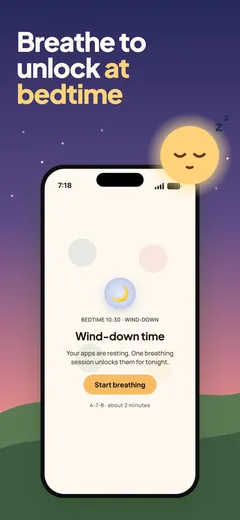
Dawnova’s Evening Wind-Down turns step 3 into the unlock. At your wind-down time your chosen apps pause, and one guided breathing session, such as 4-7-8 breathing, opens them for the night. Skip the breathing and they stay paused until midnight. If you scroll late because the evening is the only time that feels like yours, read our piece on revenge bedtime procrastination, and for the full bedtime routine see how to stop using your phone before bed.
What if you can’t stop scrolling even when you want to?
If you can’t stop scrolling even while you’re telling yourself to, stop relying on that in-the-moment decision. Put the decision earlier, when you’re calm, and let a setting carry it out later. A schedule, a timer or a locked app does the stopping, so you don’t have to.
For the moment itself, three small moves help:
- Check in, don’t quit. Mayo Clinic’s advice is that you don’t have to stop at once; notice how you feel, then give yourself five or ten more minutes and check in again (Mayo Clinic Press).
- Change your posture. Sit up, stand up, or put the phone face down on a table. Lying down is a strong scrolling cue.
- Leave a breadcrumb. Save the post you were about to read for later. You’ll rarely go back, and that tells you something.
Why it sticks. Each fix here works without a burst of willpower at 1am or 6am. The plan, the schedule and the block were set up earlier by a calmer version of you, so the tired version only has to follow along. That’s also why Dawnova ties its unlocks to real actions, a short walk and a sky photo in the morning and a breathing session at night: the habit you want is the way back in.
How long does it take to break the habit?
Expect a new routine to take weeks, not days. In a study of 96 volunteers forming a new daily habit, the median time until it felt automatic was 66 days, with a range of 18 to 254 days (Lally and colleagues, European Journal of Social Psychology). Missing one day didn’t derail the process.
So judge progress by trend, not by any single night. Check your weekly screen time report every Sunday, and notice whether the scroll still starts in the same places. If one moment keeps winning, add one more layer of friction to that moment only. For a structured week, our dopamine detox for phone addiction plan lays out seven days of steps.
When is doomscrolling a sign of something more?
Doomscrolling becomes a sign of something more when it comes with low mood, worry you can’t switch off, or sleep problems that last for weeks. In those cases the scroll is often a symptom, and the most useful step is talking to a doctor or a licensed therapist, alongside the fixes above.
Pay attention if you scroll to avoid a feeling rather than out of boredom, or if a news event keeps you up night after night. The UF researchers noted that doomscrolling and anxiety appear to reinforce each other, so getting support for one tends to help with the other.
Frequently asked questions
What is the fastest way to stop doomscrolling right now?
Put the phone down somewhere you can’t reach from where you’re sitting, then do one physical thing: stand up, drink water, open a window. If you need a guarantee, start a timed block of your feeds for 30 minutes. A block that ends on its own is easier to accept than quitting with no end in sight.
Why do I doomscroll at night when I’m tired?
Tiredness lowers your ability to stop, and bed is a strong scrolling cue. Late at night is also when many people get their first free time of the day, so the scroll feels like a reward. The fix is a set time when feeds close, a phone that charges outside the bedroom, and a short ritual that replaces the last scroll.
Is doomscrolling bad for your mental health?
Researchers link doomscrolling with anxiety and lower wellbeing, but they haven’t settled which comes first. The University of Florida team behind the doomscrolling scale believes the two feed each other. If scrolling leaves you anxious or low most days, cut back and talk to a professional if it doesn’t lift.
Should I delete social media apps to stop doomscrolling?
Deleting works for some people, but most reinstall within days. A steadier approach is to keep the apps and add friction: move them off the home screen, log out, batch their notifications, and block them during your worst moments, like the first hour after waking and the last hour before sleep.
Can an app blocker stop doomscrolling?
A blocker helps most when it covers the moments you scroll on autopilot and doesn’t rely on a passcode you know. Timed blocks, daily limits and unlocks tied to an action, such as walking 15 steps in the morning or a breathing session at night, give the feed an end point you don’t have to choose in the moment.
Sources
- University of Florida News, UF study finds doomscrolling is a unique behavior (Jan 2022), on Sharma, Lee and Johnson, Technology, Mind, and Behavior, doi:10.1037/tmb0000059.
- Wood W, Rünger D. Psychology of Habit. Annual Review of Psychology, 2016.
- Kushlev K, Proulx J, Dunn EW. “Silence Your Phones”: Smartphone Notifications Increase Inattention and Hyperactivity Symptoms. CHI 2016.
- Fitz N, et al. Batching smartphone notifications can improve well-being. Computers in Human Behavior, 2019.
- Gollwitzer PM, Sheeran P. Implementation Intentions and Goal Achievement: A Meta-analysis. Advances in Experimental Social Psychology, 2006.
- Burnell K, et al. Daily links between objective smartphone use and sleep among adolescents. Journal of Adolescence, 2024.
- Lally P, et al. How are habits formed: Modelling habit formation in the real world. European Journal of Social Psychology, 2010.
- Mayo Clinic Press, Doom scrolling and mental health.
Dawnova is a wellness tool, not a medical device. If scrolling comes with ongoing low mood, anxiety or sleep problems, talk to a doctor or a licensed mental health professional.

Written by the Dawnova team. We build Dawnova, an app blocker that gets you up and outside each morning, and we use every fix in this guide on our own phones. Settings paths checked on iOS 27 and Android in November 2026. Spotted something out of date? Tell us.