ADHD and phone addiction often show up together: studies link ADHD traits, especially inattention, with more problematic phone use, though they show an association rather than a cause. Phones serve up quick novelty and constant alerts, which makes them hard to put down. The tools that help most add friction at the moment of reaching for the phone, so you don’t have to rely on willpower.
Key takeaways
- In a study of 273 adults, inattention symptoms predicted problematic mobile phone use and smartphone addiction risk.
- A 2022 meta-analysis found children and teens with ADHD showed more problematic internet use than peers without ADHD.
- CHADD says screen time doesn’t cause ADHD, but overuse and ADHD symptoms can make each other worse.
- Friction that works at the moment you reach for the phone beats rules you have to remember.
- This is about habits and tools. ADHD care, including any diagnosis or treatment, belongs with a clinician.
In this guide
- Is there a link between ADHD and phone addiction?
- Why are phones so hard to put down with ADHD?
- Why does friction work better than willpower?
- Which tool matches which ADHD trait?
- A 20-minute setup for an ADHD-friendly phone
- How do you protect mornings and bedtime?
- When should you talk to a clinician?
- FAQ
Is there a link between ADHD and phone addiction?
Yes, research consistently links ADHD traits with problematic phone use. In a study of 273 adults, inattention symptoms and age predicted smartphone addiction risk and problematic mobile phone use (Panagiotidi and Overton, Current Psychology, 2020). Younger adults with more inattention looked most at risk.
The pattern holds in younger people too. A 2022 meta-analysis of 14 studies with 2,488 participants found children and teens with ADHD had more severe problematic internet use than non-clinical peers (Werling and colleagues, Journal of Behavioral Addictions). And in a two-year study of 2,587 teens in Los Angeles County without significant ADHD symptoms at the start, each extra digital media activity done many times a day was tied to about 10% higher odds of later ADHD symptoms (Ra and colleagues, JAMA, 2018).
None of these studies prove that phones cause ADHD. The JAMA authors called the link modest and said more research is needed to know whether it’s causal. CHADD, the US national ADHD organization, puts it plainly: screen time doesn’t cause ADHD, but overuse and ADHD symptoms can make each other worse.
“Phone addiction” also isn’t a formal diagnosis. Researchers usually say problematic smartphone use. Our post on dopamine detox for phone addiction covers that debate; this one is about what to do.
Why are phones so hard to put down with ADHD?
Phones are hard to put down with ADHD because they target the exact things ADHD makes harder: staying on a task, staying organized, and stopping an action once it starts. The National Institute of Mental Health describes ADHD in terms of inattention, hyperactivity and impulsivity, and a feed offers a fresh reward every swipe.
Three mechanisms show up in the research:
- Interruptions. In a two-week experiment with 221 students, people reported more inattention and hyperactivity in the week their alerts were on (Kushlev, Proulx and Dunn, 2016). The lead author added that the findings don’t show phones cause ADHD or that fewer notifications treat it.
- Effortful self-control. In interviews, adults with attention difficulties described keeping social media use in check as highly challenging and effortful, and impulsive use linked attention problems with problematic use (Arness and Ollis, 2022).
- No stopping point. Feeds and autoplay have no natural end, so stopping relies on a decision you have to make again and again.
That last point is why advice like “just use it less” lands badly. It asks for the very skill that’s in short supply at that moment.
Why does friction work better than willpower?
Friction works better than willpower because it acts before the decision, not during it. Habits are triggered by context, like a place or a time of day, and keep running even when intentions change, according to a review of habit research by Wood and Rünger (2016). Changing the context changes the habit.
Pre-made plans help too. If-then plans, such as “if I sit down to work, then my phone goes in the drawer,” had a medium-to-large effect on reaching goals in a meta-analysis of 94 studies (Gollwitzer and Sheeran, 2006). Pair the plan with a setting that carries it out, and the plan no longer depends on remembering it.
Good friction for ADHD has three features: it works on its own, it’s visible, and it ends at a clear point. A block that lasts an hour and then lifts is easier to accept than an open-ended ban, and a timer you can see helps when time gets slippery.
Which tool matches which ADHD trait?
Match each tool to the moment it protects. The table pairs common ADHD-related patterns with a phone setting or habit that adds friction at that moment. It’s a starting map, not a prescription; keep what helps and drop the rest.
| Pattern | What it looks like | Friction that helps |
|---|---|---|
| Distractibility | One buzz pulls you out of a task | Notifications off for everything except people; summaries for the rest |
| Impulsivity | Opening an app before you’ve decided to | Feeds off the home screen; logged out; a timed block during work |
| Losing track of time | “Five minutes” becomes an hour | A daily limit that closes the app for the day; a visible countdown |
| Hyperfocus on a feed | Scrolling well past bedtime | A scheduled bedtime block that needs a calm action to lift |
| Slow starts | Scrolling in bed instead of getting up | A morning block that ends when you’re up and moving |
| Visual pull | Bright icons and thumbnails grab attention | Grayscale, especially in the evening |
Why it sticks. Every tool in the map runs without you having to remember it. You set it up once, on a good day, and it shows up at the right moment on a hard one. That’s the idea behind Dawnova’s blocks too: the way back into your apps is a short, concrete action, like 15 steps and a photo of the sky, not a promise to yourself.
A 20-minute setup for an ADHD-friendly phone
You can set up an ADHD-friendly phone in about 20 minutes by doing five things in order: cut notifications, clear the home screen, turn on grayscale for evenings, add a daily limit to your biggest time sink, and schedule blocks for work, bedtime and the first hour of the morning.
- Notifications (5 min). Turn off alerts for every app that isn’t a person or a time-sensitive tool. Batch email and news into a summary. Our dumbphone mode guide has the exact paths and a keep/batch/off table.
- Home screen (3 min). One page, tools only. Feeds live in the app library or drawer, so opening one takes a search.
- Grayscale (2 min). Set it as a shortcut so you can flip it on in the evening and off for photos or maps.
- A daily limit (5 min). Give your top one or two apps a daily budget in minutes or opens. Our app limits guide covers iPhone and Android.
- Scheduled blocks (5 min). Block distracting apps during your focus hours, at bedtime and in the morning. Write the if-then plan on a sticky note next to where you work.
Dawnova (our app) covers steps 4 and 5 in one place. Quick Block locks your chosen apps for 15 minutes up to 2 hours with one tap, and it’s free. Daily limits give apps a budget, then keep them closed until tomorrow. The allowlist blocks everything except the apps you keep, which helps when there are too many distractions to list one by one. See choosing which apps to block to get started.
How do you protect mornings and bedtime?
Protect mornings and bedtime with blocks that end through an action, not a tap. Mornings are when a quick check can swallow the first hour, and bedtime is when hyperfocus on a feed can push sleep back. A block that lifts only after you’ve moved or wound down makes the transition for you.
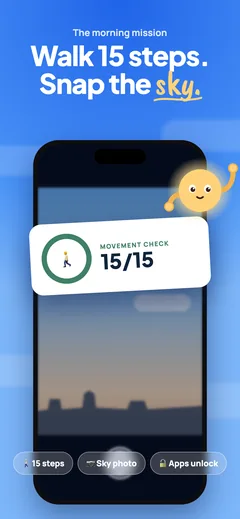
Dawnova’s Morning Focus keeps the apps you pick blocked until you walk 15 steps and snap a photo of the real sky. It gets you vertical and near daylight before the first feed, and morning daylight is the main cue for your body clock. At night, Evening Wind-Down pauses your apps until one short guided breathing session. For the full routines, see a morning routine without your phone and revenge bedtime procrastination.
When should you talk to a clinician?
Talk to a clinician if you think you might have ADHD, if you have a diagnosis and your phone use is getting worse, or if scrolling comes with low mood, anxiety or sleep problems. Friction tools help with habits; they aren’t ADHD care. NIMH lists medication and psychosocial interventions as the standard treatments.
A doctor, psychiatrist or psychologist can assess what’s going on and suggest options such as cognitive behavioral therapy, coaching or medication. CHADD has resources for finding support. Phone settings work well alongside that care, and they’re worth setting up whatever you decide.
Frequently asked questions
Does ADHD make you more likely to be addicted to your phone?
Studies link ADHD traits, especially inattention, with more problematic phone use in adults and more problematic internet use in children and teens. These are associations, not proof of cause, and phone addiction isn’t a formal diagnosis. CHADD says overuse and ADHD symptoms can make each other worse, so it’s worth adding friction early.
Can too much phone use cause ADHD?
There’s no evidence that phones cause ADHD. A 2018 JAMA study found a modest link between frequent digital media use and later ADHD symptoms in teens, and its authors said more research is needed to know if the link is causal. CHADD states that screen time is not the cause of ADHD.
What is the best app blocker for ADHD?
Look for a blocker that works without you remembering it: scheduled blocks, daily limits that end for the day, and an unlock that needs a real action rather than a code you know. Visible timers and a clear end point help too. Try a short free block first and see whether it fits your days.
Why do I hyperfocus on my phone at night?
Late evening is often the first unstructured time of the day, and feeds have no natural stopping point. Tiredness also makes stopping harder. A scheduled bedtime block helps, especially one that lifts only after a calm action like a breathing session, so the end of the scroll doesn’t depend on a decision at midnight.
Will ADHD medication stop phone overuse?
That’s a question for your prescriber, who knows your situation. Whatever your treatment plan, phone habits are learned patterns tied to cues like your bed or desk, so changing those cues with settings and blocks is useful either way. Mention your phone use at your next appointment if it worries you.
Sources
- Panagiotidi M, Overton P. Attention deficit hyperactivity symptoms predict problematic mobile phone use. Current Psychology, 2020.
- Werling AM, et al. Problematic use of digital media in children and adolescents with ADHD compared to controls: a meta-analysis. Journal of Behavioral Addictions, 2022.
- Ra CK, et al. Association of Digital Media Use With Subsequent Symptoms of ADHD Among Adolescents. JAMA, 2018.
- CHADD, Too Much Time Online? Suggestions for Limiting Media Use (ADHD Weekly).
- National Institute of Mental Health, Attention-Deficit/Hyperactivity Disorder (last reviewed August 2026).
- Kushlev K, Proulx J, Dunn EW. “Silence Your Phones”: Smartphone Notifications Increase Inattention and Hyperactivity Symptoms. CHI 2016; ScienceDaily summary.
- Arness and Ollis. A mixed-methods study of problematic social media use, attention dysregulation, and social media use motives. Current Psychology, 2022.
- Wood W, Rünger D. Psychology of Habit. Annual Review of Psychology, 2016.
- Gollwitzer PM, Sheeran P. Implementation Intentions and Goal Achievement: A Meta-analysis. Advances in Experimental Social Psychology, 2006.
This article is about phone habits and tools. It isn’t medical advice and doesn’t diagnose or treat ADHD. Dawnova is a wellness tool, not a medical device. For ADHD assessment or care, talk to a qualified clinician.

Written by the Dawnova team. We build Dawnova, an app blocker that gets you up and outside each morning. We aren’t clinicians; we read the studies cited here and link each one so you can check them. Reviewed November 2026. Spotted something out of date? Tell us.